Abstract
Every plan to tune, replace or move mainframe sort starts with a list of the sorts, and the list is nearly always wrong. It's usually built by searching the JCL for the name of the sort program. That finds the sorts that announce themselves. It misses the ones running inside application programs, database utilities, third-party products and TSO sessions, and it counts jobs that don't run any more. In this paper I go through where sort hides in a z/OS shop, compare the static evidence in the libraries with the dynamic evidence the system writes as work runs, and lay out a method for reconciling the two. The finding that matters most in practice is about recording. DFSORT's most useful dynamic record, SMF type 16, is off by default, and it can be switched on for batch sorts while staying off for program-invoked ones. The first thing to do in any inventory is check.
1. Why start with an inventory?
Sort is rarely the reason for a migration, but it shows up in almost every batch stream a migration touches. An IBM Redbook on batch modernization says it's not unusual for a shop to run 5,000 to 10,000 jobs in one evening,1 and most of those jobs sort, merge or copy data between the programs that do the business work. Whatever happens to that batch (a new sort engine, rehosted jobs or rewritten programs), somebody has to know which sorts exist, what each one does and how much data it handles.
That list turns into the specification. It sets the scope of the test corpus, the features a replacement sort engine has to support, the volumes it has to get through inside the batch window and the order the applications can move in. Two earlier papers in this series, Same Input, Same Output and Changing Your Sort Engine Without Changing Your Batch, assume that list exists. In this one I want to talk about how you build it. The most expensive way to find a sort is after cutover, when a quarter-end job calls one from inside a program.
The usual first try is a text search of the JCL for PGM=SORT. It's a reasonable place to start and a poor place to stop. It over-counts jobs that don't run any more, and it under-counts sorts that never show up in JCL under a sort program name.
2. Where sort hides
Exhibit 1 lists the ways a sort can get invoked in a z/OS shop, what each one looks like in the libraries and what each one leaves behind when it runs. They fall into four groups.
In the JCL
The easy case is a step that runs the sort product by name: SORT or ICEMAN, a product-specific name such as SYNCSORT, a front end such as ICETOOL, or a copy utility such as ICEGENER. Even these often aren't where a search expects them. The step may sit in a cataloged procedure, or in a member pulled in by an INCLUDE statement from a library named on JCLLIB. The program name, the control-statement data set or the member name may be a symbolic parameter that only gets resolved when the job is converted.2 The control statements themselves may be in-stream, in a partitioned data set member, or written by an earlier step at run time. Since JES added symbol substitution in in-stream data, even an in-stream SORT FIELDS statement can contain symbols whose values only exist at submission.3 Most workload schedulers can also substitute variables into JCL as they submit it.
Inside application programs
A COBOL SORT or MERGE statement calls the installed sort product. Its INPUT and OUTPUT PROCEDUREs become the E15 and E35 exits the program uses to pass records to and from the sort,4 and extra control statements can be supplied in a data set whose default ddname is IGZSRTCD.5 PL/I has the PLISRTA to PLISRTD subroutines, which differ in whether input and output are data sets or PL/I procedures.6 Assembler programs can call the sort with a parameter list. Language Environment provides the CEE3SRT callable service and an AMODE 64 equivalent,7 and IBM’s JZOS toolkit gives Java programs a DfSort class that can feed records to DFSORT from Java streams.8 In every one of these cases the JCL runs the application program. The sort never appears on the EXEC statement.
Inside other products
Db2 utilities are the biggest example. IBM’s informational APAR II14047 lists LOAD, REORG TABLESPACE, REORG INDEX, REBUILD INDEX, RUNSTATS, CHECK DATA, CHECK INDEX and CHECK LOB as using DFSORT for their sort and merge functions, through DFSORT-only aliases, “regardless of whether or not you have a license for DFSORT”.9 IBM’s separate Db2 Sort product can also handle some utility sort functions.10 Several IMS database utilities, including Database Prefix Resolution and Change Accumulation, also call the sort program internally.11 So do third-party products. SAS on z/OS, for example, decides at run time between its own sort and the host sort utility. Under the default SORTPGM=BEST, the choice depends on how many bytes are being sorted.12 So the same PROC SORT can use the host sort on month-end volumes and not on ordinary days.
At the terminal
TSO users and REXX or CLIST procedures can call the sort directly, and DFSORT keeps separate defaults for sorts invoked under TSO.13 These sorts are usually ad hoc, but some turn into part of an operational routine without ever going into the scheduler. The ISPF editor’s own SORT command is a false positive. It sorts lines in an edit session and doesn't call the sort product.
Exhibit 1. Where sort hides, and what finds it
| Route | What it looks like | Found by a JCL scan? | What the step record (SMF 30) names |
|---|---|---|---|
| Direct JCL step | EXEC PGM=SORT, ICEMAN, SYNCSORT; ICETOOL; ICEGENER | Yes, if every alias is searched | The sort program |
| Procedure or INCLUDE | EXEC of a cataloged PROC; INCLUDE MEMBER= via JCLLIB | Only after expansion against the right library order | The sort program, under the procedure step name |
| Symbolic or generated | PGM=&SORTPGM; SYSIN DSN=&CTL; statements written by an earlier step; scheduler variables | Only with the values used at run time | The sort program; statements visible only in SYSOUT |
| COBOL SORT / MERGE | SORT verb with INPUT/OUTPUT PROCEDURE (E15/E35); IGZSRTCD | No: needs a source scan | The COBOL program |
| PL/I, assembler, LE, Java | PLISRTA–D; parameter-list call; CEE3SRT; JZOS DfSort | No: needs a source or load-module scan | The calling program |
| Db2 utilities | LOAD, REORG, REBUILD INDEX, RUNSTATS, CHECK | Only if utility steps are counted as sorts | The Db2 utility program |
| IMS utilities | Prefix Resolution, Change Accumulation | Only if utility steps are counted | The IMS utility or region controller |
| Third-party products | SAS PROC SORT with SORTPGM=BEST or HOST; other ISV tools | No: decided at run time | The product’s program |
| TSO, REXX, CLIST | CALL of the sort; REXX host commands | Only if exec libraries are scanned | The TSO session |
Sources as cited in the text. Where it's turned on, SMF type 16 records the sort itself on every DFSORT route.
3. Static evidence: what the libraries say
Static analysis reads what's stored: JCL, procedure, INCLUDE and control-statement libraries, program source, exec libraries and production load libraries. Done properly, it takes four steps.
- Get the real library order. For each production job, use the JCLLIB order, the system procedure libraries and the load-library concatenation that actually apply in production. The ones that apply in test can be different.
- Expand, then search. Resolve procedures, INCLUDE members and symbolic parameters, then search the expanded JCL for every sort program name and alias your installed products answer to.
- Scan the source. Search COBOL for SORT and MERGE statements, PL/I for PLISRT calls, assembler for calls to the sort, and REXX and CLIST for sort invocations. Write down which program, and which paragraph or procedure, holds each one.
- Close the gap to production. Where source is missing or you're not sure which version is running, look at the load modules. Link-edit maps and external references show which modules call which, although a program that builds a module name at run time won't give it away.
Static evidence is complete for what's stored, and it ties each sort to an owner and a library. Its weak spots are built in. It can't tell a live job from one that hasn't run in years. It can't evaluate COND parameters or IF/THEN/ELSE constructs,2 so a step that only runs when an earlier step fails, or only at year-end, looks like any other. It can't see control statements that don't exist until an earlier step writes them, variables a scheduler fills in at submission, or the run-time choice a product like SAS makes.
4. Dynamic evidence: what the system records
Dynamic evidence gets written as work runs. Four sources matter, and each one answers a different question.
SMF type 30, subtype 4, is written at the end of every job step.14 It has the job and step names, the program executed, CPU time on general-purpose and zIIP engines, elapsed time and I/O counts.15 It's the census of what ran. The catch is that it names the program on the EXEC statement, so every program-invoked sort in Exhibit 1 gets recorded under the name of the calling program.
SMF type 16 is written by DFSORT itself, with subtypes for short records, full records and unsuccessful runs.14 Since DFSORT writes it, it records the sort whether it was called from JCL, a COBOL program or a Db2 utility; II14047 confirms the records are written for Db2 utility sorts.9 It has overall input and output record counts, inserts and deletes by exits, and, with SMF=FULL, counts for each output data set.16 The full record has sections for input data sets, SORTOUT, OUTFIL and record-length distribution,13 and IBM publishes DFSORT symbols and sample jobs for reporting on it.17
SMF types 14 and 15 are written when a data set opened for input or output is closed.15 They give you data set names, record formats and lengths where the sort record doesn't, and they show lineage: which job created the SORTIN that a later job reads.
The scheduler’s database, whether it's IBM Z Workload Scheduler, Broadcom’s CA 7 or BMC’s Control-M, holds what SMF can't: which jobs are defined to run, on what calendar, with what predecessors, and when each one last ran. Along with these, the job’s SYSOUT has DFSORT’s messages: the control statements as processed, ICE201I with the record type, ICE054I with records in and out, ICE055I with records inserted and deleted, and ICE052I at the end.18, 19 Parsing retained SYSOUT is the only way to see control statements that were generated at run time.
5. Putting the two together
On the question that matters most, what actually runs, dynamic evidence wins. The gap can be big. A Google Cloud specialist writing about mainframe assessments reported cases where “more than 60% of the overall inventory is found inactive”.23 That's one vendor’s anecdote, and it isn't a survey. The mechanism is familiar, though. Libraries rarely get pruned, because deleting a job is riskier than keeping it. You still need the static evidence, for the opposite reason. It shows what's written down, and a sort that's defined but didn't run in the collection window may just be waiting for quarter-end.
Reconciliation matches the two at step level. The join key is job name, step name and procedure step name, and the run time ties each SMF 16 record to the SMF 30 step record written for the same step. Each sort then lands in one of three regions (Exhibit 2), and each region has its own follow-up.
Exhibit 2. Reconciling static and dynamic evidence
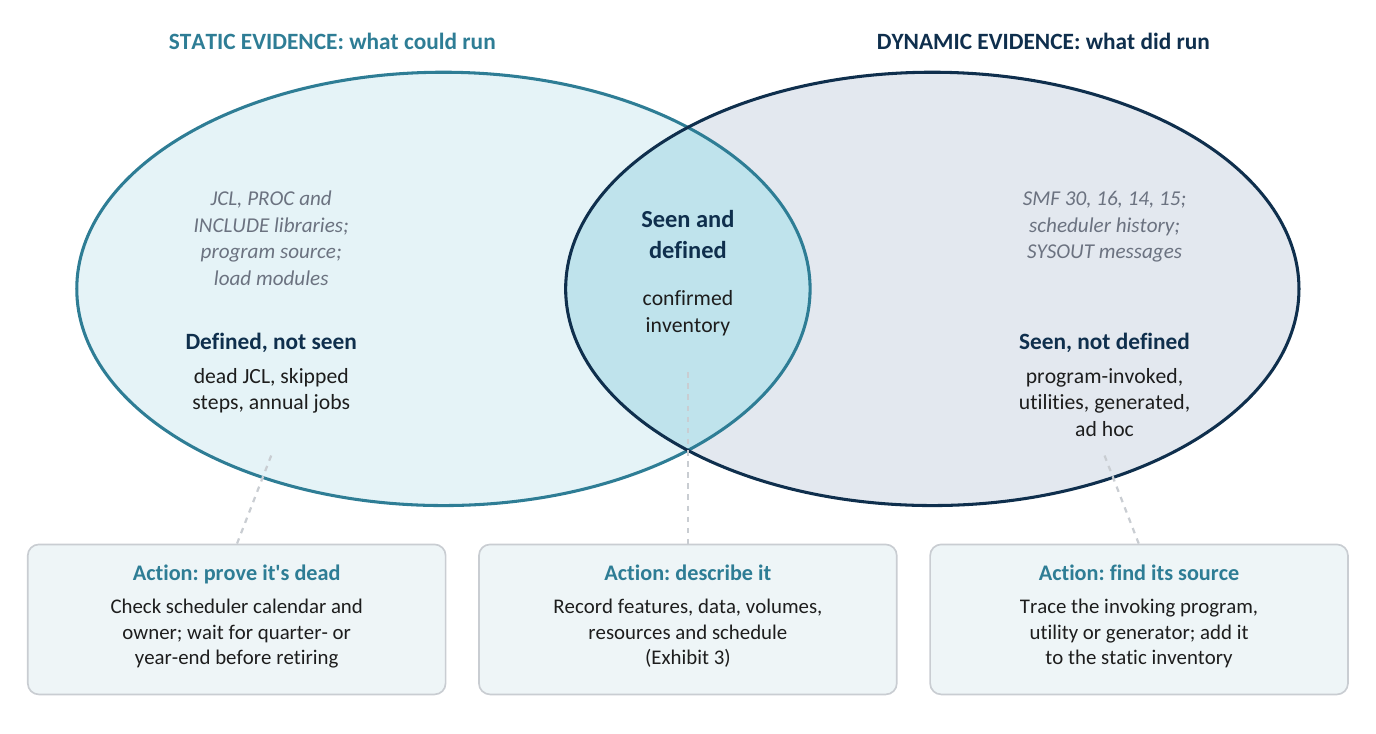
Schematic. The overlap is the working inventory. The two outer regions are the investigation list.
Seen, not defined is where the hidden sorts turn up: an SMF 16 record whose step ran a COBOL program, a Db2 utility or SAS. Each one needs tracing back to its source, so the static inventory records why the sort happens as well as the fact that it happened. Defined, not seen needs proof before anything gets retired. Check the scheduler calendar, the owner and the conditional logic. A step that only runs after a failure, or a job scheduled for the last working day of the year, is live even if the collection window missed it.
How long to collect
The collection window decides how much of the defined-not-seen region is really dead. The minimum is one full calendar month that includes a month-end, since month-end runs often carry the biggest volumes and the jobs that run at no other time. A quarter-end is better. Some assessment practice recommends analyzing SMF for the previous 15 to 18 months to catch all active work;23 few shops keep detailed step-level SMF that long, and for sort you rarely need it. A practical compromise is a detailed collection of SMF 16, 30, 14 and 15 over one to three months. Use scheduler history and calendars to find every job defined to run less often, and check those jobs when they next run.
6. What to record for each sort
An inventory is only as useful as what it records. A list of job names is enough for scoping. A list that records features, data and volumes lets you plan testing, size a replacement sort engine and put the migration in order. Exhibit 3 shows the columns we recommend, grouped by purpose, with the source for each group.
Three of them are worth calling out. Features used decides whether it's feasible, because the risk is in the minority of sorts that use exits, report writing or product-specific extensions. Data characteristics matter because a replacement sort engine may not support every access method or encoding you use. Flag VSAM data sets and Unicode or double-byte fields now, so you don't find them in testing. And peak volume is what the target has to sort inside the batch window, so record that as well as the average.
Exhibit 3. Inventory columns, grouped by purpose
| Group | Columns | Primary source |
|---|---|---|
| Identity | Job, step, procedure step; program on EXEC; invoking program; invocation environment (JCL, program, TSO); sort product and name called | SMF 30, SMF 16, expanded JCL |
| Control statements | Location (in-stream, member, generated, parameter data set); library and member; symbols used; resolved text and a hash of it | JCL and source scan, SYSOUT |
| Function and features | SORT, MERGE or COPY; ICETOOL operators; INCLUDE/OMIT, INREC, OUTREC, OUTFIL, SUM, JOINKEYS; EQUALS; alternate collating sequence; exits used (E15, E35, others); product-specific extensions | Parsed statements, SMF 16, ICE messages |
| Data | Input and output data set names; RECFM, LRECL; VSAM or sequential; character encoding and any Unicode or DBCS fields; records in, out, inserted, deleted; bytes | SMF 16 (FULL), SMF 14 and 15, ICE054I, ICE055I |
| Resources | CPU on general-purpose and zIIP engines; elapsed time; I/O counts; work space | SMF 30, SMF 16 |
| Schedule | Frequency; calendar (daily, month-end, quarter-end, annual); predecessors and successors; place on the critical path; date last run | Scheduler database, SMF 30 |
| Disposition | Move unchanged, convert, rewrite, retire, or keep on z/OS; owner; test evidence reference | Project decision |
Recommended minimum. Record volumes per run, with the maximum as well as the typical value.
7. A 30/60/90-day plan
For most shops the work fits in ninety days, as long as collection starts early. It can't be squeezed into less than the collection window. Exhibit 4 shows the sequence.
Exhibit 4. A 30/60/90-day inventory plan
| Period | Main work | Output |
|---|---|---|
| Days 1–30: switch on and scope | Check DFSORT defaults in every environment and switch SMF 16 on; confirm SMFPRMxx collects types 14, 15, 16 and 30; list sort products and their names; extract libraries and scheduler history; start the static scan; keep SYSOUT for sort steps | Collection running; product map; first static list |
| Days 31–60: collect and match | Collect through a month-end; parse SMF 16, 30, 14 and 15 and retained SYSOUT; match at step level; trace every seen-not-defined sort to its program, utility or generator | Reconciled inventory, version 1, in three regions |
| Days 61–90: characterize and decide | Parse statements for features; add data and volume columns; check defined-not-seen jobs against calendars and owners; agree on tiers and dispositions | Signed-off inventory; test candidates; retirement list pending proof |
Indicative. Keep collecting after day 90 until you've seen at least one quarter-end.
Switching SMF 16 on, or from SHORT to FULL, adds SMF volume, so get the capacity team to agree on the setting first. If you leave it running, the same collection shows whether sorts are being added faster than they're being moved.
8. Bottom line
- Sort hides in plain sight. A lot of sorts run inside programs, utilities and products whose step records name something else. Searching for PGM=SORT only gets you started.
- Check the recording before you trust it. DFSORT’s SMF 16 is off by default and set per environment. Confirm what's being written, for every environment and every sort product, before collection starts.
- Use both kinds of evidence. Dynamic evidence shows what ran. Static evidence explains why, and shows what may still run. The inventory is the overlap, and the outer regions are your work list.
- Include month-end, then quarter-end. The collection window has to cover the periods with peak volumes and rare jobs. The scheduler calendars cover the rest.
- Record features and data along with the names. The columns in Exhibit 3 turn a list into a test plan and a basis for sizing whatever comes next, including a decision to leave a sort where it is.
References
1. IBM Redbooks, Batch Modernization on z/OS, SG24-7779-01, July 2012, §1.3.
2. IBM, z/OS MVS JCL Reference: EXEC, JCLLIB, INCLUDE and SET statements; symbolic parameters; COND and IF/THEN/ELSE/ENDIF conditional execution. Cited by title.
3. IBM, z/OS 2.3 documentation, “Using symbols in JES in-stream data” (SYMBOLS=JCLONLY, EXECSYS, CNVTSYS).
4. IBM, z/OS DFSORT Application Programming Guide (z/OS V2R1): invoking DFSORT from a program; E15 and E35 user exits.
5. IBM, Enterprise COBOL for z/OS 6.5 Programming Guide, “Default characteristics of the IGZSRTCD data set”; Enterprise COBOL Language Reference, SORT and MERGE statements.
6. IBM, Enterprise PL/I for z/OS 5.3 Programming Guide, “Calling the Sort program”; IBM, z/OS 2.4 DFSORT Getting Started, “Calling DFSORT from a PL/I program”.
7. IBM, z/OS Language Environment Programming Reference, “CEE3SRT: call DFSORT”; z/OS 2.4, “__CEEYSORT: call DFSORT for AMODE 64 applications”.
8. IBM, IBM SDK, Java Technology Edition 8 documentation, JZOS Toolkit API, class com.ibm.jzos.DfSort.
9. IBM, Informational APAR II14047, “Use of DFSORT by DB2 Utilities”, last modified 23 January 2023.
10. H. Roberts (IBM), “Db2 for z/OS Utilities Update”, GSE UK Conference, November 2020, session 1BE.
11. IBM, IMS 15 Database Utilities: Database Prefix Resolution utility (DFSURG10); Database Change Accumulation utility (DFSUCUM0). Cited by title.
12. SAS Institute, SAS 9.3 Companion for z/OS, 2nd ed., “SORTPGM= System Option: z/OS”.
13. IBM, z/OS DFSORT Installation and Customization, SC23-6881 (z/OS 3.2 edition, SC23-6881-70): ICEMAC environments; ICEPRMxx PARMLIB members; listing installation defaults; collecting statistical data; ICETEXIT.
14. F. Kyne (ed.), Cheryl Watson’s SMF Reference Summary, Watson & Walker, 24 January 2021.
15. IBM, z/OS MVS System Management Facilities (SMF), SA38-0667-09 (V2R2): record types 14, 15, 16 and 30.
16. M. Packer (IBM), “A Record Of Sorts”, Mainframe, Performance, Topics blog, 10 January 2020.
17. IBM Support, “DFSORT Symbol definitions for SMF Type 16 records and generate reports on DFSORT Use of Z Sort Accelerator”, last modified 15 August 2022.
18. IBM, z/OS DFSORT Messages, Codes and Diagnosis Guide, SC26-7525: messages ICE000I, ICE052I, ICE054I, ICE055I, ICE201I.
19. IBM-MAIN mailing list, “ICETOOL / DFSORT Substring Search Limit?”, 31 July 2019 (job output showing ICE201I, ICE054I and ICE052I).
20. IBM, Informational APAR II14213, “Use of DFSORT by DB2 Utilities (continued from II14047)”, last modified October 2020.
21. IBM, z/OS MVS Initialization and Tuning Reference (z/OS 2.4), “SMFPRMxx (system management facilities (SMF) parameters)”.
22. Pacific Systems Group, “Sample Syncsort SMF Report from SMF 208 Records” (title as listed), accessed September 2026. Vendor source.
23. A. Gupta, “Minimalizing the mainframe”, Google Cloud blog, 9 May 2022. Vendor source.