Abstract
Sort is one of the oldest and heaviest workloads on the mainframe, and hardly anyone looks at what it costs. This paper walks through how IBM actually bills for z/OS software, and why the cost of a sort step depends much more on when it runs and which pricing model you are on than on how much CPU it burns. The short version: at a lot of shops you could delete every overnight sort and the monthly software bill would not move. At others it would drop, but by less than the CPU numbers suggest. Under consumption pricing you get most of it back. You can find out which camp you are in from SMF data you already collect, and you should, before anybody tunes, offloads or moves anything.
1. Why bother looking at sort?
Because there's a lot of it. Donald Knuth wrote that computer makers in the 1960s figured more than a quarter of their machines' running time went to sorting, and that at a lot of installations it was over half.1 Nobody has published a good number for today. One sort vendor says up to 20 to 25 percent of mainframe CPU and up to 30 percent of I/O channel capacity, but they don't cite a study, so I'd treat that as the high end for a batch-heavy shop, not the average.2
Here is a better tell. When IBM designed the z15, they put a sort instruction (SORTL) and a dedicated sort accelerator right on the chip, and turned it on for DFSORT with APAR PH03207.3 Chip designers don't spend silicon on things that don't matter. And batch is still big. IBM's own Redbook on batch says it's not unusual for a shop to run 5,000 to 10,000 jobs in one evening,4 and most of those job streams sort, merge or copy something between steps.
The platform isn't going anywhere either. IBM says 43 of the 50 biggest banks in the world and 8 of the 10 biggest payment companies run on IBM Z.5 The z17 shipped in June 2025.6 In BMC's 2026 survey of more than 1,300 people, 69 percent said their general-purpose capacity was growing,7 and in Kyndryl's 2025 survey of 500 organizations exactly one planned to get off the mainframe completely.8 So we're going to be sorting on these machines, and paying for it, for a long time.
I have a personal reason for caring about this. Back in the 1980s I was a systems programmer at Acxiom, which ran seventeen IBM mainframes. We built what we called the Attached Processor: jobs stayed on MVS, which did all the disk and tape I/O, while the CPU-heavy work ran on a cheaper machine. We did it because CPU on the mainframe was expensive. What I didn't appreciate back then, and what a lot of people still don't, is that the software bill doesn't follow CPU the way you'd think.
2. How IBM actually bills you
Most of the big IBM products (z/OS, CICS, Db2, IMS, MQ) are Monthly License Charge products, which IBM describes as a charge that "applies each month."9 Most large shops are on sub-capacity pricing. That means the charge for each product is based on the highest rolling four-hour average (R4HA) of MSUs used each month by the LPARs where each product runs.9
The mechanics are simple once you see them. Every five minutes the system averages the last 48 five-minute intervals.10 IBM's Sub-Capacity Reporting Tool (SCRT) reads the SMF 70 and 89 records, picks the highest value between the 2nd of one month and the 1st of the next, and you send IBM one report per machine by the 9th.9 If a product runs in several LPARs, you pay on their highest combined four-hour average. If you've set a defined or group capacity limit, you pay on whichever is lower, the peak or the cap.11
Two things follow from that, and everything else in this paper hangs on them.
- One window sets the bill. For each product, one four-hour stretch decides the month. The other 700 or so hours don't.
- Work outside that window doesn't show up in your MLC. As one capacity planner put it, work outside the peak "will not affect software costs."12 It still uses hardware, power and people, and it still counts for anything licensed on machine capacity.
Tailored Fit Pricing
In May 2019 IBM brought in Tailored Fit Pricing, which the trade press called the first real change to mainframe software pricing in about twenty years.13 There are two flavors. The Software Consumption Solution bills for the MSUs you actually use, added up hourly, which IBM said "removes the need for manual or automated capping."14 The Enterprise Capacity Solution bills on the size of the hardware. In the example IBM published at launch, usage above the committed baseline was priced at half the baseline rate.14 A little over 20 clients piloted it in 2019, and IBM said more than 100 were on it by 2021.15
IBM doesn't publish MLC list prices. You'll see per-MIPS numbers all over the place, from a few hundred dollars a year to over three thousand, but they lump hardware, software and staff together, they mostly come from people selling alternatives, and contracts vary so much that some people who know this area well say not to use averages at all.16 The share of the budget is better known, if a bit old. Forrester found in 2013 that MLC was often a third or more of the mainframe software budget,17 and a 2019 Aberdeen study paid for by BMC found 48 percent of organizations spending 25 to 50 percent of their software budget on MLC, with costs going up 4 to 11 percent a year.18
Exhibit 1. What drives the bill under each pricing model
| Model | What sets the monthly charge | Does sort outside the peak cost MLC? | What it means for sort |
|---|---|---|---|
| Sub-capacity (R4HA) | Highest rolling four-hour average MSUs in the month, per product, or the defined or group cap if lower | No | Depends on whether sort runs inside the peak window |
| Sub-capacity with capping | Lower of the R4HA peak and the cap; work over the cap gets delayed, not billed | No | Sort may stretch the batch window instead of raising the bill |
| TFP Software Consumption | Total MSUs used, added up hourly, against a committed baseline | Yes | Close to sort's share of MSUs used, depending on the baseline terms |
| TFP Enterprise Capacity | Size of the physical machine | Not directly | Only matters if it forces a capacity upgrade |
Sources: IBM Z Software Pricing Reference Guide; IBM Tailored Fit Pricing announcement materials, 2019.9, 14
3. The question that decides it: when does sort run?
Since the bill follows the peak, the first question about any workload is whether it's part of the peak. Sort lives mostly in batch, so the question becomes: what sets the peak at your shop? It's different from one shop to the next, and often from one month to the next. IntelliMagic put it well: some sites peak in the daytime on online work, while at others "monthly peaks occur during the night shift and are driven by batch, often at month-end."19
Whatever sets the peak pays more than its share. In one IntelliMagic example, CICS was 41 percent of the MSUs used in a day but 56 percent of the four-hour peak the bill was based on.20 Flip that around and work that runs away from the peak pays less than its share, maybe nothing. Exhibit 2 shows both cases on a made-up LPAR.
Exhibit 2. Same sort workload, two different bills (illustrative)
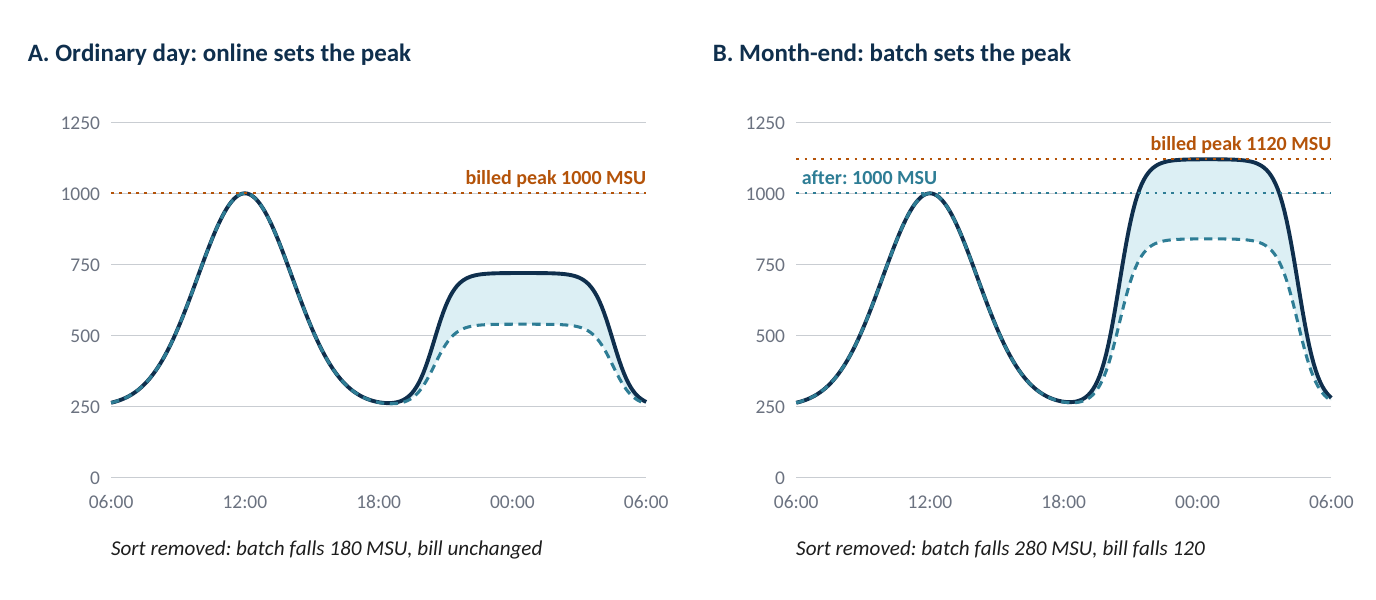

Made-up LPAR. Online work peaks at 1,000 MSU (four-hour average) around midday. Sort is assumed to be 25 percent of batch MSUs. These numbers are for illustration, not from any client.
On an ordinary day (panel A) the overnight batch peak of 720 MSU is well under the online peak. Pull every sort step out and batch drops by 180 MSU, and the bill stays exactly where it was. At month-end (panel B) batch climbs to 1,120 MSU and sets the bill. Pull sort out and you remove 280 MSU from the batch window, but the billable peak only drops to the online peak of 1,000. That's 120 MSU, about 11 percent. The other 160 MSU of sort were never on the bill to begin with. Exhibit 3 adds consumption pricing to the comparison.
Exhibit 3. What happens if you take all sort off general-purpose engines (illustrative)
| Scenario | Before | Sort MSUs removed | Billable after | Change in what you pay on |
|---|---|---|---|---|
| A. R4HA, online peak | Peak 1,000 (online); batch 720 | 180 from batch | 1,000 | 0% |
| B. R4HA, month-end batch peak | Peak 1,120 (batch); online 1,000 | 280 from batch | 1,000 | -10.7% (120 of 280 MSU counted) |
| C. TFP consumption | 500,000 MSUs used in the month; batch 45% | 56,250 (11.25% of total) | 443,750 | Up to -11.25%, depending on the baseline |
Made-up figures. Sort is assumed to be 25 percent of batch MSUs in every scenario.
4. Your options
Once you know which case you're in, you have four kinds of moves. They change different things: how much CPU sort uses, which engine it runs on, or which platform.
Tune it where it is: the on-chip accelerator
On a z15 or later, DFSORT can use the Integrated Accelerator for Z Sort. You turn it on with OPTION ZSORT once APAR PH03207 is in; it's off by default.3 IBM's numbers for going from a z14 to a z15 with the accelerator are up to 40 percent less CPU and up to 30 percent less elapsed time for records up to 500 bytes; on a z15 with it on versus off, up to 30 percent less CPU.3 An independent test of one 44 GB sort saw 37.7 percent less CPU and 51.3 percent less elapsed time,22 and Cheryl Watson's Tuning Letter reported 20 to 30 percent less elapsed time and up to 40 percent less CPU.23 Read the fine print, though. It isn't used for COPY, MERGE, SUM or JOINKEYS, for VSAM data, for sorts called from programs, when there's INREC, OUTREC or OUTFIL reformatting, or when memory is tight.3 Find out how much of your own sort work qualifies before you count on it.
Move it to specialty engines
IBM says it "does not generally assess IBM software charges on zIIP capacity."24 So work running on a zIIP stays out of the four-hour average. DFSORT itself doesn't use zIIPs except for Db2 utility work, and an IBM developer said publicly in 2016 there was no plan to change that.25 Some third-party sorts say they can move up to 90 percent of eligible sort work to zIIP.26 That's a vendor number and it depends on your mix. The real test is how much sort CPU shows up as zIIP time in your own SMF 30 records.
Run it on Linux on the same box
Integrated Facility for Linux (IFL) engines run Linux on IBM Z or LinuxONE. IBM says an IFL "does not increase charges for IBM Z software running on 'standard' processors, nor does it affect the MSU rating."27 Sort work moved to Linux on an IFL is out of the z/OS four-hour average entirely. The data stays on the same machine, which keeps the moving cost down, but you still have to get it across the operating system boundary and change the job streams to do it.
Move it off the mainframe
Moving sort to distributed or cloud machines takes its MSUs away completely, and it usually happens as part of a bigger migration. This is also where the hidden costs are: moving the data, getting exactly the same results (collating sequences, EBCDIC versus ASCII, packed decimal and binary fields, variable-length and spanned records), and regression testing every job that depends on the output. Big rewrites have a rough track record. In Rocket Software's 2024 research, nine out of ten rewrite projects didn't succeed the first time.28 Sort is usually one of the easier pieces to move, because what you're moving is a set of control statements that describe the result. You still have to prove the output is identical. Don't assume it.
Exhibit 4. The four options side by side
| Option | What it changes | What you need | Watch out for |
|---|---|---|---|
| Scheduling | Moves sort out of the peak window | A batch-driven peak and some slack in the batch window | Service levels and job dependencies |
| Z Sort accelerator | Less CPU per sort | z15 or later, DFSORT, PH03207 applied, OPTION ZSORT | A lot of sort types don't qualify |
| zIIP offload | Moves CPU to an engine MLC doesn't count | Spare zIIP capacity and a sort product that uses it | Offload varies; vendor claims |
| Linux on IFL | Takes the work out of z/OS MSUs | IFL capacity; job streams re-plumbed | Getting data across the OS boundary |
| Off the mainframe | Removes the MSUs entirely | A target platform and a data path | Identical output and regression testing |
5. Measure it before you move it
You can do every one of these steps with data your shop already collects.
- Find your peaks. From the SCRT reports and SMF 70 and 89, find the four-hour window that set each of the last twelve monthly bills, product by product, and mark each one as online-driven or batch-driven.
- Measure sort. DFSORT writes an SMF type 16 record for each sort, with record counts and, with SMF=FULL, data set detail and, since PH03207, a Z Sort section.29 Join it to the SMF 30 step records to get the CPU, general-purpose and zIIP, for each sort step. Then split it into sort CPU inside the peak windows and outside them.
- Work out your ceiling. For the months batch set the peak, measure the gap between that peak and the next-highest four-hour window. That's the most any batch reduction can save you that month.
- Check your contract. Are you on R4HA, capped or TFP? If it's TFP, find out how your committed baseline treats reductions. Every contract is different.
- Try the cheap stuff first. Rescheduling, the Z Sort accelerator and zIIP eligibility can all be tested on a sample of jobs in a few weeks.
- Then, and only then, price a move, including moving the data, proving the output is identical and running in parallel, and compare it with the savings you measured in steps 2 and 3, not with total sort CPU.
6. The bigger picture
People are asking these questions more because modernization spending is going up. One market estimate puts mainframe modernization services at $8.39 billion in 2025, growing 9.7 percent a year to $13.34 billion by 2030.30 The big cloud and platform vendors have all put out AI tools for converting mainframe code: IBM's watsonx Code Assistant for Z and Google's Dual Run in 2023, and AWS Transform for mainframe in May 2025.31 There's plenty for them to work on. A 2022 Micro Focus study put the COBOL in daily use at more than 800 billion lines.32
But most shops are going hybrid. In Kyndryl's 2025 survey, 98 percent of organizations were moving some applications off the mainframe, but the average share they planned to move had dropped from 36 to 28 percent, and 70 percent said they had trouble finding skilled people.8 IBM's Institute for Business Value found 91 percent of executives favoring a hybrid approach.33 In a hybrid shop, sort sits right on the seam: data gets sorted on one platform and used on another, and where each sort runs becomes a decision you keep making for years. One caution: most of these surveys were paid for by vendors with a stake in the answer, so take them as a rough guide.
7. Bottom line
- CPU isn't cost. Under sub-capacity pricing, what a sort costs you in software depends on whether it runs inside the monthly peak. A lot of sort doesn't.
- There's a ceiling. If batch sets the peak, taking sort out only gets you down to the next peak. The size of the sort workload is the wrong way to measure what's at stake.
- Your pricing model changes the answer. Under consumption pricing, sort costs you close to its share of what you use, and every bit of efficiency counts.
- The answer is already on disk. SMF 16, 30, 70 and 89 will tell you. If you measure before you move, you'll make a better call, whether that's tuning, offloading, moving, or leaving it alone.
References
1. D. E. Knuth, The Art of Computer Programming, Vol. 3: Sorting and Searching, 2nd ed., Addison-Wesley, 1998, p. 3.
2. Precisely (formerly Syncsort), product literature on mainframe sort resource consumption, undated. Vendor source.
3. IBM, APAR PH03207 (DFSORT support for the Integrated Accelerator for Z Sort), closed 23 September 2020; IBM DFSORT documentation and z15 performance statements.
4. IBM Redbooks, Batch Modernization on z/OS, SG24-7779-01, July 2012, §1.3.
5. IBM, “What is a mainframe?”, IBM Think, updated 3 September 2026.
6. IBM, IBM z17 announcement, 8 April 2025; general availability 18 June 2025.
7. BMC, 2026 Mainframe Survey, 1 September 2026 (n > 1,300). Vendor-sponsored.
8. Kyndryl, State of Mainframe Modernization Survey, 9 September 2025 (n = 500). Vendor-sponsored.
9. IBM, IBM Z Software Pricing Reference Guide, ZSO01378-USEN, June 2020.
10. IBM, z/OS RMF documentation: four-hour rolling average computation.
11. S. Baker, Planet Mainframe, 2018, on sub-capacity billing and capping.
12. E. Ottaviani, EPV Technologies, July 2019.
13. Data Center Knowledge, coverage of IBM Tailored Fit Pricing, May 2019.
14. IBM, Tailored Fit Pricing for IBM Z, announcement and presentation materials, 14 May 2019.
15. Forbes, 2019; eWEEK, 2021, reporting IBM TFP adoption figures.
16. C. S. Mullins, commentary on mainframe cost-per-MIPS estimates; see also Heirloom Computing/AWS, 2018.
17. Forrester Research, 2013, on Monthly License Charges as a share of mainframe software budgets.
18. Aberdeen Group, sponsored by BMC, 2019. Vendor-sponsored.
19. T. Havekost, IntelliMagic, 11 May 2023.
20. IntelliMagic, analysis of CICS contribution to the four-hour rolling average.
21. BMC, example of batch rescheduling reducing the monthly four-hour peak.
22. Betten and Burg, white paper on IBM Z Sort acceleration results, 2 July 2021.
23. Cheryl Watson’s Tuning Letter, 2022 No. 2.
24. IBM, IBM zIIP product documentation.
25. IBM DFSORT developer, IBM-MAIN mailing list, 18 July 2016.
26. Precisely, ZPSaver product literature. Vendor source.
27. IBM, Integrated Facility for Linux (IFL), ibm.com/products/integrated-facility-for-linux.
28. Rocket Software, research release, 24 September 2024.
29. IBM, DFSORT SMF type 16 record documentation and reporting samples, 15 August 2022.
30. MarketsandMarkets, Mainframe Modernization market report, 21 August 2025.
31. IBM (22 August 2023); Google Cloud (16 March 2023); AWS (15 May 2025): product announcements.
32. Micro Focus / Vanson Bourne, COBOL survey, 4 February 2022.
33. IBM Institute for Business Value with Oxford Economics, 10 October 2024 (n = 2,551).